
48/96 Schedule Calendar
See the 48/96 firefighter rotation for your platoon by date, with the hours per 28-day period and the overtime it creates.
Free · runs in your browser · nothing is uploaded
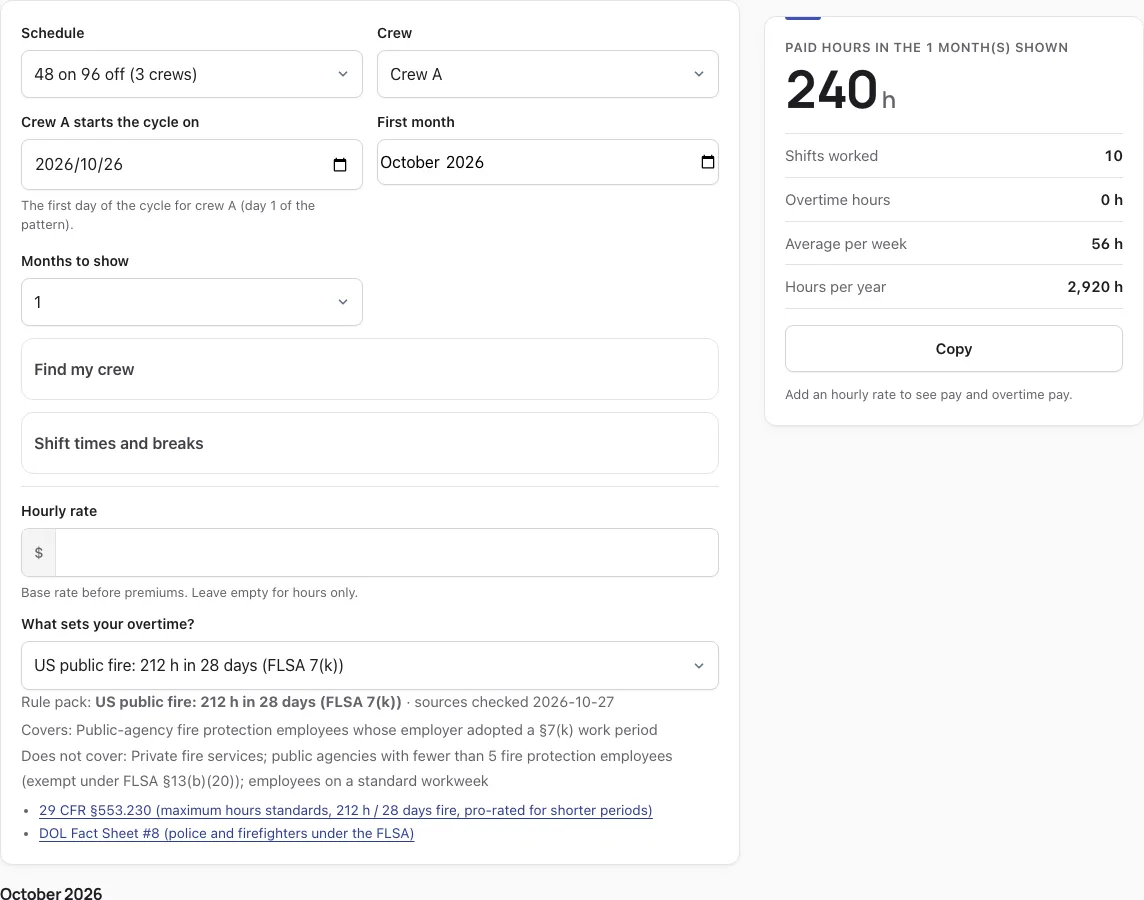
How to use the 48/96 Schedule Calendar
- Open Schedule and choose 48 on 96 off.
- Set Crew A starts the cycle on to the first day of the rotation for crew A. The other crews follow the same cycle, offset by a fixed number of days.
- Use the Crew menu to switch between crews A, B, C and D and view each calendar.
- If you know a shift and date you worked, pick them and tap Find my crew to see which crew was on.
- Check Shift times and breaks. Default times are 07:00 to 19:00 for day and 19:00 to 07:00 for night, and 07:00 to 07:00 for a 24-hour shift. Adjust them to match your schedule, along with any unpaid break.
- Enter your Hourly rate and choose a rule pack under What sets your overtime?
- Use First month and Months to show to pick the period the result card covers.
- Tap any day to record what really happened: sick, vacation, off or swapped on a work day, or a picked-up shift on a day off. The rotation itself stays the same.
- Select Download calendar (.ics), Download CSV or Print to take your schedule with you.
Your marks are stored only in this browser, so use the same browser each time. Select Clear my marks to remove them.
What is a 48/96 schedule?
A 48/96 schedule is a 6-day rotation in which each crew works two back-to-back 24-hour shifts, then has four full days off. The tool’s version uses three crews, so one crew is always on duty at any hour.
Crew A’s sequence is X X O O O O, where X is a 24-hour shift and O is an off day.
How many hours a week is a 48/96 schedule?
A 48/96 schedule averages about 56 paid hours per week, which is 48 hours on duty every 6 days. In a single Monday to Sunday week, the total can range from 48 to 72 hours.
| Measure (48 on 96 off) | Value |
|---|---|
| Cycle length | 6 days |
| Crews | 3 |
| Work days per crew per cycle | 2 |
| Longest run on / off | 2 days / 4 days |
| Average paid hours per week | 56 |
| Range in a Monday-Sunday week | 48 to 72 hours |
| Shifts per year | 121.7 (about 61 two-day blocks) |
| Paid hours per year | 2,920 |
| Weekends fully off | 50% |
| 24/7 coverage, default times | Yes, every hour covered by one crew |
What’s better, 24/48 or 48/96?
Neither is inherently more hours. Both average about 56 hours a week with three platoons, so the choice comes down to how you want your time off arranged.
| Feature | 48/96 | 24/48 |
|---|---|---|
| Average hours per week | 56 | 56 |
| Shift structure | Two back-to-back 24-hour shifts | Single 24-hour shifts |
| Days off in a row | 4 | 2 |
| Longest stretch on duty | 48 hours | 24 hours |
The 48/96 gives you longer breaks between rotations, but requires 48 straight hours on duty.
How do I export my 48/96 schedule to a calendar?
Download a calendar file with one event per worked shift, then import it into your calendar app.
- Pick your crew and set Crew A starts the cycle on so the dates are correct.
- Select Download calendar (.ics).
- For Google Calendar, open Settings, choose Import & export, select the file, and pick the calendar to add it to.
- For Apple Calendar or Outlook, open the .ics file or use the import option in the app.
Use Download CSV if you want shifts with paid, regular and overtime hours in a spreadsheet.
What does a 48/96 pay estimate look like for one month?
Crew A from 1 November to 28 November 2026, at $30 an hour under the FLSA §7(k) fire protection rule (212 hours in 28 days), comes to 10 shifts and 240 paid hours. That leaves 28 overtime hours at 1.5x and an estimated gross pay of $7,620.00.
| Result (Crew A, 1 to 28 Nov 2026) | Value |
|---|---|
| Shifts worked | 10 |
| Paid hours | 240 |
| Regular hours | 212 |
| Overtime hours (1.5x) | 28 |
| Estimated gross pay | $7,620.00 |
Change the rule pack under What sets your overtime? to compare other US packs, including FLSA 40-hour, California and the 8 and 80 rule. The result card recalculates each time.
More questions
How do I mark a sick day or a swapped shift?
Tap the day and choose the mark. On a work day you can record sick, vacation, off or swapped shift. On a day off you can record a picked-up shift. The rotation does not change.
Are my marks saved?
Your marks are stored only in the browser you use. Select Clear my marks to remove them.
Why does the coverage line warn about a gap?
It appears when your shift times leave a gap or overlap in coverage. Fix the start, end or break times under Shift times and breaks.
Why does my pay estimate differ from my paycheck?
The estimate uses only the rule pack you pick. Contracts and union agreements can differ, so your pay may not match. The estimate is not payroll or legal advice.
How this tool works and where the numbers come from
The calendar repeats the rotation from your crew’s start date and counts every shift minute by minute. Overtime and pay are worked out over whole workweeks (or the 7(k) and 7(j) work periods) under the rule pack you pick, following the official texts below. Results are estimates, not legal or payroll advice.
Sources
- 29 U.S.C. § 207 (FLSA § 7): overtime after 40 hours a week; § 7(j) hospitals (8 and 80); § 7(k) fire and police work periods (U.S. Code, 2023 Edition) · checked
- 29 CFR § 553.230: maximum hours table, 212 h fire / 171 h police per 28 days and shorter periods (eCFR current as of 2026-10-23) · checked
- 29 CFR § 553.224: the 7(k) work period (7 to 28 consecutive days) (eCFR current as of 2026-10-23) · checked
- 29 CFR § 553.222: sleep time, excludable only on tours of duty of more than 24 hours (eCFR current as of 2026-10-23) · checked
- 29 U.S.C. § 213(b)(20) (FLSA § 13(b)(20)): fire and police agencies with fewer than 5 such employees (U.S. Code, 2023 Edition) · checked
- 29 CFR Part 778: overtime compensation (regular rate, workweek) (eCFR current as of 2026-10-23) · checked
- 29 CFR § 778.105: the workweek is a fixed and regularly recurring period of 168 hours (eCFR current as of 2026-10-23) · checked
- 29 CFR § 778.207(b): shift differentials are part of the regular rate (eCFR current as of 2026-10-23) · checked
- California Labor Code § 510: daily overtime over 8 hours, double time over 12, seventh day (as amended by Stats. 1999, ch. 134, effective 2000-01-01) · checked
- California Labor Code § 500: workday, workweek and alternative workweek schedule defined (added by Stats. 1999, ch. 134, effective 2000-01-01) · checked
- U.S. Office of Personnel Management: federal holidays (5 U.S.C. § 6103) · checked
- U.S. Department of Labor, Fact Sheet #8: law enforcement and fire protection employees (Revised March 2011) · checked
- U.S. Department of Labor, Fact Sheet #23: overtime pay requirements of the FLSA (Revised October 2019) · checked
- California DLSE: overtime FAQ · checked
Frequently asked questions
Who uses the 48/96 schedule?
The 48/96 is a 24/7 rotation that suits crews who must cover every hour with shifts of 24 hours. The tool’s pattern splits that coverage across three crews. Career fire crews are the most common example.
How many work blocks are in a 48/96 year?
There are about 61 two-day blocks a year, which is 121.7 shifts divided by two. That works out to roughly 2,920 paid hours.
What fire departments use the 48/96 schedule?
This page cannot list specific departments. Check with your local department or union to learn which rotation they run.
Is overtime on a 48/96 different from a 24/48?
Overtime depends on the rule pack and the days in your window. With the same 56-hour weekly average, a 28-day period holds roughly 224 hours on either rotation, so the 7(k) overtime comes out close.
48/96 vs Kelly schedule: what is the difference?
The Kelly schedule runs a 9-day cycle: three 24-hour shifts, each followed by a day off, with the last one followed by four days off. The 48/96 pairs two 24-hour shifts back to back, then gives four days off in a row.
Are back-to-back 24-hour shifts safe or even allowed?
Working 48 hours in a row is how this rotation is built. Whether your own employer allows it, and how rest is handled, depends on your contract or union agreement and local rules, so check those.
How do I add my 48/96 schedule to Google Calendar?
Download the .ics file with Download calendar (.ics), then import it in Google Calendar’s Settings under Import & export. Each worked shift becomes its own event.
How do I build my 48/96 shift calendar?
Choose 48 on 96 off, set the start date for Crew A, check your shift times, then pick the crew you work in with the Crew menu. The calendar fills in from there.
Related tools
- Shift Calendar Maker: use it to build a rotation for a pattern other than 48/96.
- DuPont Schedule Calendar: use it if you are comparing a 28-day rotation with night shifts.
- Pitman Schedule Calendar: use it to see another common rotation laid out month by month.
- 4 On 4 Off Schedule Calendar: use it if you work four days on and four days off.
- 12 Hour Shift Schedule Comparison: use it to compare 12-hour rotations side by side.
- Overtime Calculator for Shift Workers: use it to test overtime figures outside this calendar.
- Timesheet Calculator: use it to total hours from your own time records.
- How Many Work Hours in a Year: use it to see how a rotation adds up over a full year.