
Pitman Schedule Calendar
Pick your crew to see the 14-day Pitman (2-2-3) rotation by date and the hours, overtime and pay each week brings.
Free · runs in your browser · nothing is uploaded
The Pitman schedule calendar shows a 2-2-3 shift rotation as month calendars, one crew at a time. Pick a crew and it shows which days that crew works, how many paid hours it logs, and an estimated gross pay under the overtime rule you choose.
The rotation uses four crews (A, B, C and D) on a 14-day cycle with 12-hour day and night shifts. You can set your own start date and shift times, record sick days, vacation and swaps, and export the shifts to a calendar file or a CSV. A week-by-week table shows which calendar weeks pass 40 hours.
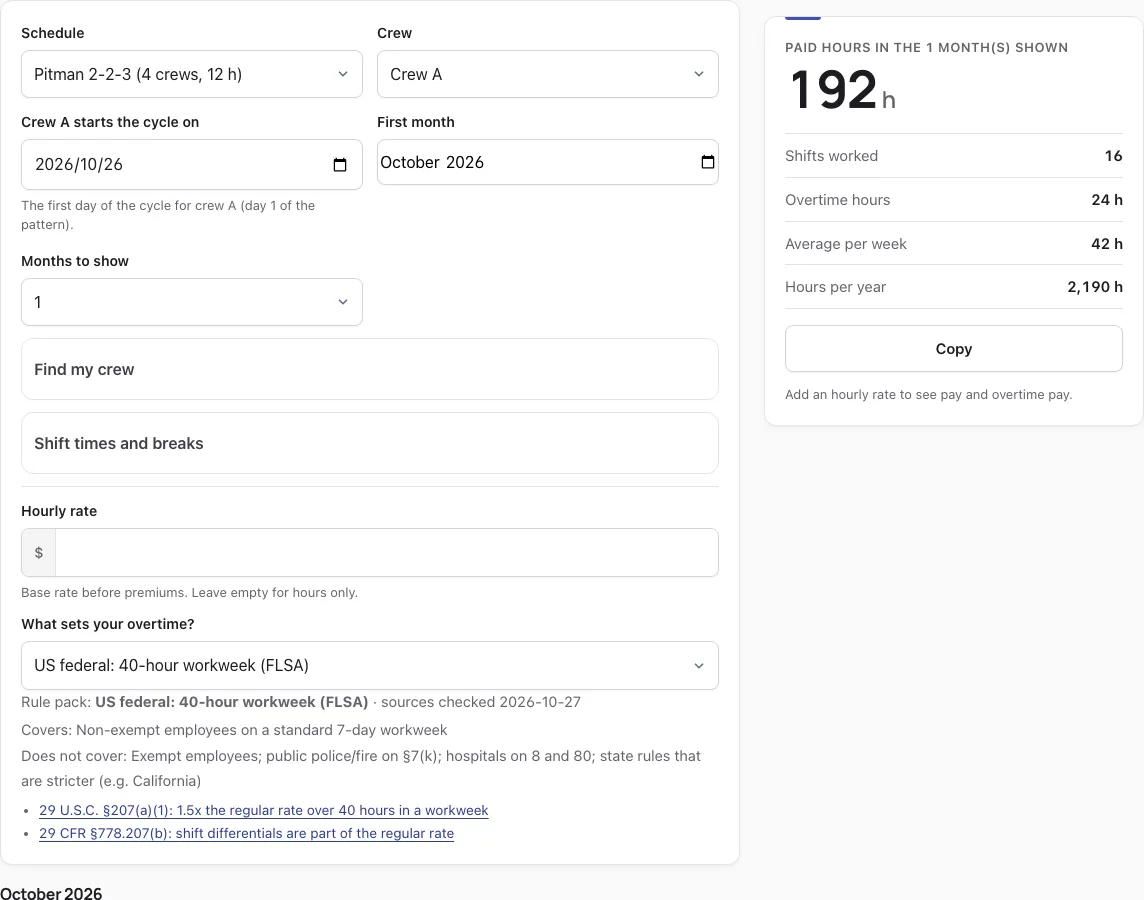
How to use the Pitman Schedule Calendar
- Set Schedule to the Pitman 2-2-3 (fixed days and nights) preset.
- Enter the date under Crew A starts the cycle on. The other crews follow the same cycle, delayed by a fixed number of days.
- Check Shift times and breaks. The defaults are 07:00-19:00 for days and 19:00-07:00 for nights, with no unpaid break.
- Choose a crew from Crew, or use Find my crew with a shift and date to see who is on.
- Enter your Hourly rate and pick a rule pack under What sets your overtime?
- Set First month and Months to show, then read the result card for paid hours, shifts, overtime and estimated gross pay.
- Tap a day to record what really happened. On a work day it cycles through sick, vacation, off and swapped shift. On a day off it marks a picked-up shift. The rotation itself does not change.
Use Print to print the calendar without the form. Download calendar (.ics) adds one event per worked shift to Google, Apple or Outlook. Download CSV lists each shift with paid, regular and overtime hours and pay. Clear my marks removes your marks, which are stored only in this browser. Public holidays are underlined, so you can see which of your shifts fall on one.
How does the Pitman schedule work?
Pitman is a 14-day, four-crew rotation of 12-hour shifts that keeps a site staffed day and night. Within the fortnight a crew’s blocks run 2 on, 2 off, 3 on, then 2 off, 2 on, 3 off. In this tool, crew A’s sequence is D D O O D D D O O D D O O O, where D is a 12-hour day shift, N a 12-hour night shift, and O a day off.
The other crews run the same cycle, starting a fixed number of days later, so one crew is on duty at any hour. With the default times, the tool reports that every hour is covered by exactly one crew. Each crew works 7 of the 14 days, and its longest run is three days on or three days off. Half of its weekends are fully off.
How many hours a week is a Pitman schedule?
A Pitman crew averages 42 paid hours a week, but a single Monday-to-Sunday week ranges from 24 to 60 hours. Each cycle has one week of five 12-hour shifts and one week of two shifts. Over a year, a crew works about 2,190 hours across 182.5 shifts.
| Cycle week | Shifts | Paid hours | Overtime under FLSA 40 h |
|---|---|---|---|
| Week one | 5 | 60 | 20 |
| Week two | 2 | 24 | 0 |
| Average | 3.5 | 42 | depends on alignment |
The overtime column assumes the 40-hour workweek lines up with the cycle week. The tool counts overtime over whole workweeks around the months you view, so the result card can differ if the weeks are offset. A week cut by the edge of a month still counts as a whole week.
For a worked example, Crew A starting 1 November 2026, viewed for four weeks to 28 November at $30 an hour, gives 14 shifts and 168 paid hours. Under the FLSA standard 40-hour workweek, that is 128 regular hours and 40 overtime hours at 1.5x, for an estimated gross pay of $5,640.00. Under the FLSA 7(k) fire rule (212 hours in a 28-day period), the same four weeks show no overtime and an estimated gross pay of $5,040.00. These are estimates under the chosen rule pack. Contracts and union agreements can differ, and this is not legal or payroll advice.
More questions
What are the benefits of the Pitman schedule?
It keeps every hour covered by one crew, so staffing stays continuous with the default times. Each crew works about half of the days and has fully off half of its weekends. The 12-hour blocks also leave longer rest periods between shifts.
How do I implement Pitman shifts for my staff?
Set the Schedule to the Pitman 2-2-3 preset, enter the date under Crew A starts the cycle on, and check the shift times. Then use the Crew menu to view each crew and Find my crew to confirm who is on for a given shift and date. The full steps are listed in the how-to section above.
Do you get paid overtime on a Pitman schedule?
It depends on the rule pack and where the workweek falls. Under the FLSA 40-hour workweek, a 60-hour week produces 20 overtime hours, while a 24-hour week produces none. The result card shows overtime for the months you pick, but these are estimates, and contracts and union agreements can differ.
How this tool works and where the numbers come from
The calendar repeats the rotation from your crew’s start date and counts every shift minute by minute. Overtime and pay are worked out over whole workweeks (or the 7(k) and 7(j) work periods) under the rule pack you pick, following the official texts below. Results are estimates, not legal or payroll advice.
Sources
- 29 U.S.C. § 207 (FLSA § 7): overtime after 40 hours a week; § 7(j) hospitals (8 and 80); § 7(k) fire and police work periods (U.S. Code, 2023 Edition) · checked
- 29 CFR Part 778: overtime compensation (regular rate, workweek) (eCFR current as of 2026-10-23) · checked
- 29 CFR § 778.105: the workweek is a fixed and regularly recurring period of 168 hours (eCFR current as of 2026-10-23) · checked
- 29 CFR § 778.207(b): shift differentials are part of the regular rate (eCFR current as of 2026-10-23) · checked
- California Labor Code § 510: daily overtime over 8 hours, double time over 12, seventh day (as amended by Stats. 1999, ch. 134, effective 2000-01-01) · checked
- California Labor Code § 500: workday, workweek and alternative workweek schedule defined (added by Stats. 1999, ch. 134, effective 2000-01-01) · checked
- IWC Wage Order 5 (public housekeeping incl. health care), section 3(B)(8): 12-hour health care alternative workweek (effective 2002-07-01 as amended; sections 4(A) and 10(C) republished effective 2019-01-01) · checked
- California Labor Code § 511: alternative workweek schedules (up to 10-hour days without overtime) (as amended by Stats. 2012, ch. 46 (SB 1038), effective 2012-06-27) · checked
- 29 CFR § 553.230: maximum hours table, 212 h fire / 171 h police per 28 days and shorter periods (eCFR current as of 2026-10-23) · checked
- 29 CFR § 553.224: the 7(k) work period (7 to 28 consecutive days) (eCFR current as of 2026-10-23) · checked
- 29 CFR § 553.222: sleep time, excludable only on tours of duty of more than 24 hours (eCFR current as of 2026-10-23) · checked
- 29 U.S.C. § 213(b)(20) (FLSA § 13(b)(20)): fire and police agencies with fewer than 5 such employees (U.S. Code, 2023 Edition) · checked
- 29 CFR § 778.601: hospitals and residential care, 14-day period (8 and 80) (eCFR current as of 2026-10-23) · checked
- U.S. Office of Personnel Management: federal holidays (5 U.S.C. § 6103) · checked
- U.S. Department of Labor, Fact Sheet #23: overtime pay requirements of the FLSA (Revised October 2019) · checked
- California DLSE: overtime FAQ · checked
- California DLSE: overtime exceptions FAQ (alternative workweeks) · checked
- U.S. Department of Labor, Fact Sheet #8: law enforcement and fire protection employees (Revised March 2011) · checked
- U.S. Department of Labor, Fact Sheet #54: health care industry and overtime (8 and 80) (Revised July 2009) · checked
Frequently asked questions
What is a Pitman schedule?
Also called a 2-3-2 work schedule, the Pitman schedule is a 24/7 rotation where four crews each work 12-hour shifts over a 14-day cycle. Each crew works 2 days, is off 2, works 3, is off 2, works 2, and is off 3. Because the crews overlap in sequence, one crew is always on duty.
What is the 2-2-3 schedule?
The 2-2-3 is the rhythm the Pitman schedule repeats: two shifts, two days off, three shifts, and so on. This tool’s preset, Pitman 2-2-3 (fixed days and nights), applies that rhythm with 12-hour day and night shifts. Other shift patterns use a similar cadence with different shift lengths.
What is a Pitman shift pattern?
It is the same 2-2-3 rotation, used where work must be covered around the clock. Each crew follows a fixed cycle, so every hour of the day has someone on shift. The calendar shows the pattern for any date, so you can see who is working when.
Is the Pitman schedule healthy?
This tool cannot judge health. The schedule uses 12-hour shifts, which can be more tiring than 8-hour shifts, though each crew gets longer stretches of rest between work blocks. How people cope with long shifts varies, so weigh that against your own circumstances.
What is the 12-hour Pitman schedule?
It is the standard Pitman pattern built from 12-hour shifts. By default, the day shift runs 07:00 to 19:00 and the night shift runs 19:00 to 07:00, with no unpaid break. You can change these times under Shift times and breaks.
How is Pitman different from DuPont?
Pitman repeats a 2-2-3 cadence over 14 days, with each crew working 7 of those days. DuPont runs a 28-day cycle with blocks of four nights, three days and a 7-day break, and its crews rotate between days and nights, while the Pitman preset keeps fixed day and night crews. Both average 42 hours a week; the 12 Hour Shift Schedule Comparison puts them side by side.
What is the best 24/7 shift schedule?
No single pattern suits everyone. Each 24/7 shift pattern trades off shift length, days off and weekend coverage. The pattern-in-numbers table on this page lists cycle length, average hours and weekends fully off, so you can compare the Pitman pattern with others.
Which industries use Pitman team management?
Businesses and public service agencies that operate outside 9 am to 5 pm often use it to keep staffing steady. Police, ambulance services and round-the-clock plants are typical users. Your own employer’s rules set how it applies to you.
Related tools
- Shift Calendar Maker: use it when your rota is not a Pitman rotation.
- DuPont Schedule Calendar: use it to see how DuPont’s crew sequence compares.
- 4 On 4 Off Schedule Calendar: use it for a four-day-on, four-day-off rotation.
- 12 Hour Shift Schedule Comparison: use it to weigh different 12-hour rotations against each other.
- Overtime Calculator for Shift Workers: use it to check overtime figures outside this calendar.
- Timesheet Calculator: use it to total hours from start and end times.
- How Many Work Hours in a Year: use it to see annual hours for different schedules.
- 24/48 Schedule Calendar: use it for a 24-hours-on, 48-hours-off rotation.