
Shift Hours Calculator
Enter a shift's start, end and break to get the paid hours, the hours inside the night window and the pay for that shift.
Free · runs in your browser · nothing is uploaded
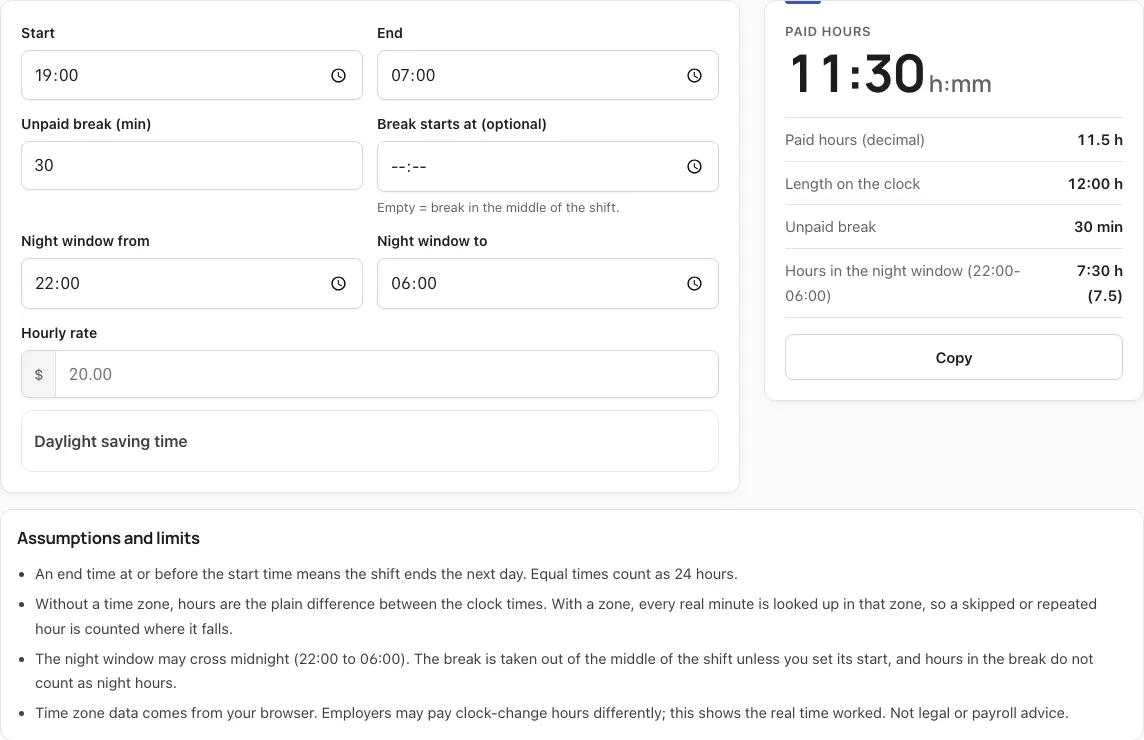
How to use the Shift hours calculator
- Type the time you start in Start. The default is 19:00.
- Type the time you finish in End. If End is at or before Start, the shift is counted as ending the next day.
- Enter the unpaid break in minutes in Unpaid break (min). The default is 30.
- Optional: fill in Break starts at (optional) to place the break at a set time. If you leave it empty, the break is taken from the middle of the shift.
- Set Night window from and Night window to. The default is 22:00 to 06:00, and the window can be any hours you choose.
- Enter an Hourly rate if you want a pay figure.
- Read the result card: Paid hours, Paid hours (decimal), Length on the clock, Unpaid break, the night-window hours, and Pay for this shift.
- For a clock-change night, open Daylight saving time, pick a Time zone, and set Date the shift starts. The buttons Spring forward: Mar 13, 2027 and Fall back: Oct 31, 2026 load ready New York examples. The card then adds Real elapsed time and Clock change effect.
The result card includes a note that pay here is straight pay, with links to the overtime and differential calculators for those cases.
How do I calculate my shift hours?
Subtract the start time from the end time, add a day if the end is at or before the start, then take out the unpaid break. What is left is your paid time, which you can write as h:mm or as decimal hours.
- Find the length on the clock: End minus Start. From 19:00 to 07:00 that is 12:00.
- If End is at or before Start, the shift runs past midnight, so add 24 hours to the end. A start and end of 09:00 counts as a 24-hour shift.
- Subtract the unpaid break: 12:00 minus 0:30 gives 11:30.
- Convert to decimal: 30 minutes is 0.5 hours, so 11:30 is 11.5 paid hours.
Worked example: a 19:00 to 07:00 shift with a 30-minute break and an $18 hourly rate gives 11.5 paid hours and 7.5 night-window hours. The break falls at 00:45 to 01:15, inside the 22:00 to 06:00 window, so it is not counted as night time. The estimated pay is $207.00.
How many hours is 5:45 to 2:30?
A 5:45 to 2:30 shift is 20:45 long if both times are morning times, because 2:30 falls the next day. If you mean 5:45 PM to 2:30 AM, it is 8:45 long. The tool applies the same next-day rule in both cases.
| Start | End | Length on the clock (no break) |
|---|---|---|
| 05:45 | 02:30 | 20:45 |
| 17:45 | 02:30 | 8:45 |
Enter a break in Unpaid break (min) to take it off either figure.
More questions
Can a night shift cross midnight?
Yes. An End at or before Start means the shift ends the next day, and the night window can also cross midnight, such as 22:00 to 06:00. You can change Night window from and Night window to to any hours.
What happens to a shift when the clocks change?
When you choose a time zone, the tool counts every real minute in that zone, so a clock change can make the real length differ from the length on the clock. Clocks going back add 1:00, and clocks going forward take 1:00 off. When clocks go back, a US non-exempt hourly employee must be paid for the extra hour actually worked under the FLSA, and it counts toward overtime; elsewhere, check your contract. When clocks go forward, the skipped hour is not worked, and whether it is still paid depends on the employer’s policy or agreement. In the fall-back example, a 19:00 to 07:00 shift in New York is 12:00 on the clock and 13 real hours.
Is the pay on this page exact?
No, it is an estimate. Pay for this shift is the hourly rate times the paid hours, with no overtime or differential, so your contract or any collective agreement may give a different amount.
Does choosing a time zone change ordinary shifts?
No. A time zone changes nothing on dates without a clock change, and the date only matters when a time zone is selected.
How this tool works and where the numbers come from
The shift length is end minus start, plus a day when it ends after midnight, minus the unpaid break. With a time zone, every real minute in that zone is counted, so a clock change adds or removes an hour (15 U.S.C. 260a).
Sources
- 29 CFR Part 785: hours worked (all time the employee is required or allowed to work) (eCFR current as of 2026-10-23) · checked
- 15 U.S.C. § 260a: daylight saving time from the second Sunday of March to the first Sunday of November (U.S. Code, 2023 Edition) · checked
Frequently asked questions
What is a time card?
A time card is the record of the clock-in and clock-out times a worker logs for each day, and employers use it to work out hours. The start, end and break times you enter here are the same kind of figures a time card holds.
Is this shift calculator free?
Yes, it is a free tool that runs in your browser. Enter your times and it works out paid hours and, if you add an hourly rate, an estimated pay for the shift.
How many hours is an 8-hour shift?
Paid time is 8:00 when the break is unpaid and sits outside the 8 hours. If a 30-minute unpaid break is part of that shift, the length on the clock is 8:30.
How does overtime calculation work?
This page calculates straight pay only: the hourly rate times the paid hours, with no overtime or shift differential added. For those amounts, use the Overtime calculator or the Shift differential calculator.
What is the FLSA overtime rule?
Federal law sets time and a half on the regular rate for every hour past 40 in a workweek, for workers who are not exempt. State rules, contracts and union agreements can differ, so check your own terms.
What time format should I use?
Enter times as clock times such as 19:00 and 07:00. The defaults use this 24-hour style, and the Start and End fields expect a time of day.
Why does my result say “Check the times”?
That message appears instead of a result when the unpaid break is as long as the shift, or when Start or End is not a valid time. Shorten the break or correct the time, and the result will show.
Does the unpaid break count as night hours?
No. Break minutes are not counted as night-window hours, even when the break falls inside the window. The break is taken from the middle of the shift unless Break starts at (optional) is set.
Related tools
- Timesheet calculator — use it when you need to total several days of clock times into one timesheet.
- Shift differential calculator — use it to estimate the extra pay some employers add for night work.
- Overtime calculator — use it when your hours go beyond the usual weekly limit and you need overtime pay.
- What time is 2nd shift — use it to check when a second shift usually starts and ends.
- How many work hours in a year — use it to see how a yearly schedule adds up in hours.
- Shift calendar — use it to lay out which days you work on a rotating roster.
- DuPont schedule calendar and pay — use it if your roster follows the DuPont shift pattern.
- 12 hour shift schedule compared — use it to compare 12-hour shift patterns before you choose one.