
Timesheet Calculator
Enter clock-in and clock-out times for each day to total your hours in h:mm and decimal, with overtime and pay for the week.
Free · runs in your browser · nothing is uploaded
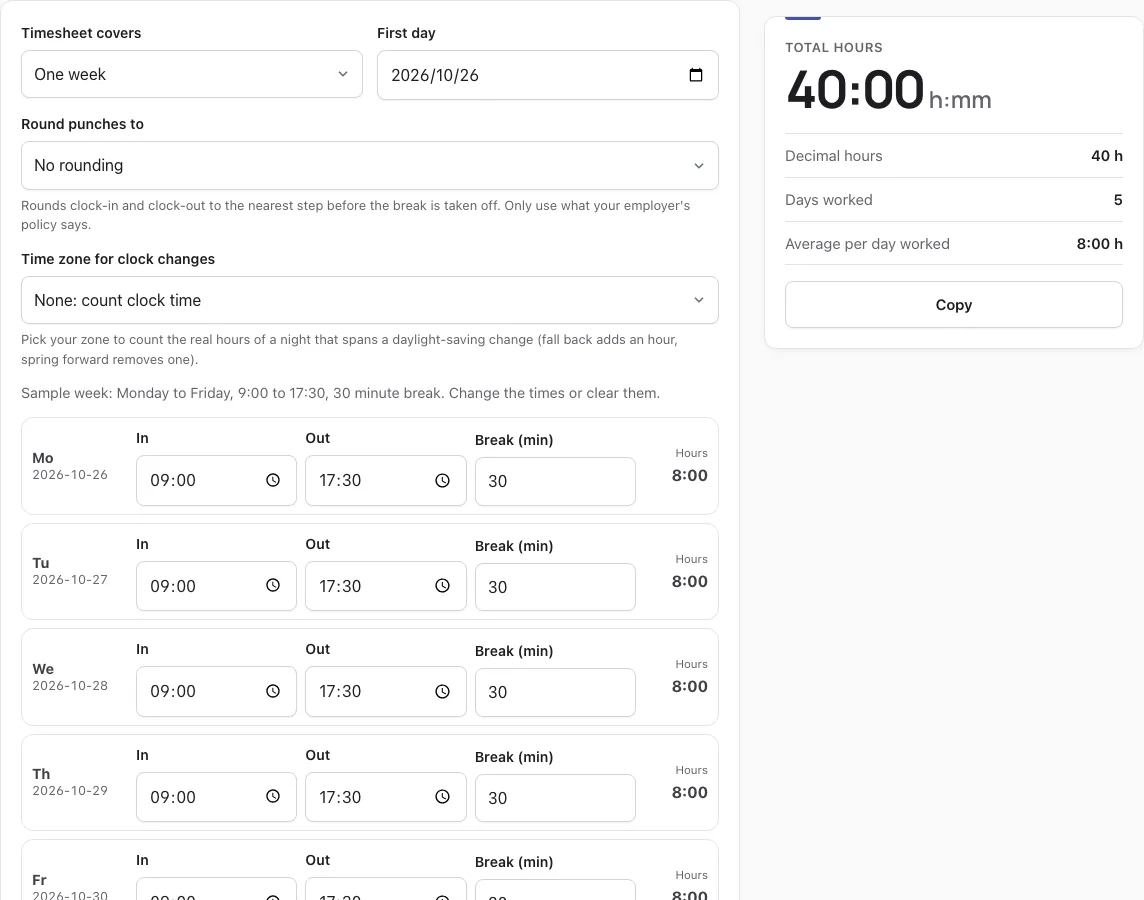
How to use the Timesheet calculator
- Pick One week or Two weeks under Timesheet covers.
- Set First day. At first open it is the Monday of the current week, with a sample Monday to Friday week of 9:00 to 17:30 and a 30 minute break already filled in.
- Choose an option under Round punches to if your employer uses rounding. Otherwise leave No rounding selected.
- Enter In, Out and Break (min) for each day. Leave In and Out empty to skip a day.
- Optional: turn on Add overtime and pay, then enter Hourly rate, Workweek starts on and a rule pack.
- Read Total hours, Decimal hours, Days worked and Average per day worked on the result card.
- Type a name in Name (shown on the printed sheet), then select Print or save as PDF.
Copy first filled day to Mon-Fri copies the first filled day’s times to the other weekdays. Reset sample brings back the example week, and Clear times empties every In, Out and Break field. Download CSV exports Date, In, Out, Break and paid hours for each row, with a Total row. A row whose times do not make sense shows a check mark and stays out of the totals until you fix it, so one typo never changes the week’s total unnoticed.
How are employees’ timesheets calculated?
Each paid shift is the time from In to Out, minus the Break (min) you enter. Rounding, if chosen, moves both punches before the break is taken off. Hours are then added across the week. The calculator follows these steps for every row.
- Read the In and Out times. If an Out time is at or before In, the shift ends the next day.
- Round both punches to the chosen step, if any.
- Subtract the break in minutes.
- Add the paid minutes for all rows, then show the total as h:mm and as a decimal.
For example, a 22:00 to 06:30 shift with a 30 minute break counts as 8:00. Short rest breaks are generally paid under the FLSA, so if a break of 20 minutes or less is paid, enter 0 in Break (min) to keep it in the hours.
What is 15 minutes on a timesheet?
Fifteen minutes is a quarter of an hour, so it is entered as .25 in decimal hours. The Nearest 15 minutes (quarter hour) option rounds punches to these steps. Other rounding steps are shown below.
| Round punches to | Step size | Decimal value of one step |
|---|---|---|
| No rounding | None | Punches used as entered |
| Nearest 5 minutes | 5 minutes | 5/60 of an hour |
| Nearest 6 minutes (tenth of an hour) | 6 minutes | .10 |
| Nearest 15 minutes (quarter hour) | 15 minutes | .25 |
What is the federal overtime pay rate?
Under the FLSA, the federal rate is 1.5 times the regular rate of pay for hours over 40 in a workweek. The Overtime hours are paid at that rate, while the rest of the hours are paid at the regular rate. This table uses the tool’s own example at $20 an hour.
| Item | Value |
|---|---|
| Paid hours (Mon-Fri 9:00-19:30, 30 min break) | 50 h |
| Regular hours at $20 | 40 h, $800.00 |
| Overtime hours at 1.5x ($30/h) | 10 h, $300.00 |
| Estimated gross pay | $1,100.00 |
How does punch rounding work under 29 CFR 785.48?
The rounding options follow the reference in the tool’s source line, 29 CFR 785.48, which allows rounding to the nearest 5 minutes, tenth of an hour or quarter hour when it averages out over time. A tie rounds up. Rounding changes both punches before the break is subtracted, so a day can move by up to 15 minutes. For example, 8:53 to 17:08 with quarter-hour rounding becomes 9:00 to 17:15, which is 495 minutes (8:15). With 6-minute rounding, 07:03 is a tie and rounds up to 07:06, so 07:03 to 15:00 gives 474 minutes (7:54). Follow what your employer’s policy says.
More questions
What records must employers keep for overtime?
Payroll records must be kept for 3 years and time cards for 2 years under 29 CFR 516.5 and 516.6, and some states require longer periods.
Does the calculator send my data anywhere?
No. Everything runs in your browser, and nothing you enter leaves your device.
What does a “check” in a row mean?
It means the break is as long as the shift or longer, or the times do not make sense. That row is left out of the totals until you fix it.
How this tool works and where the numbers come from
Punches are rounded as you choose (29 CFR 785.48), unpaid breaks are subtracted, and each row is counted in minutes; with a time zone, real minutes across a clock change are used. Overtime is optional and follows the rule pack you pick.
Sources
- 29 U.S.C. § 207 (FLSA § 7): overtime after 40 hours a week; § 7(j) hospitals (8 and 80); § 7(k) fire and police work periods (U.S. Code, 2023 Edition) · checked
- 29 CFR Part 778: overtime compensation (regular rate, workweek) (eCFR current as of 2026-10-23) · checked
- 29 CFR § 778.105: the workweek is a fixed and regularly recurring period of 168 hours (eCFR current as of 2026-10-23) · checked
- 29 CFR § 778.207(b): shift differentials are part of the regular rate (eCFR current as of 2026-10-23) · checked
- California Labor Code § 510: daily overtime over 8 hours, double time over 12, seventh day (as amended by Stats. 1999, ch. 134, effective 2000-01-01) · checked
- California Labor Code § 500: workday, workweek and alternative workweek schedule defined (added by Stats. 1999, ch. 134, effective 2000-01-01) · checked
- IWC Wage Order 5 (public housekeeping incl. health care), section 3(B)(8): 12-hour health care alternative workweek (effective 2002-07-01 as amended; sections 4(A) and 10(C) republished effective 2019-01-01) · checked
- California Labor Code § 511: alternative workweek schedules (up to 10-hour days without overtime) (as amended by Stats. 2012, ch. 46 (SB 1038), effective 2012-06-27) · checked
- IWC Wage Order 4 (professional, technical, clerical), section 3(B): alternative workweek schedules (effective 2002-01-01 as amended; sections 4(A) and 10(C) republished effective 2019-01-01) · checked
- 29 CFR § 553.230: maximum hours table, 212 h fire / 171 h police per 28 days and shorter periods (eCFR current as of 2026-10-23) · checked
- 29 CFR § 553.224: the 7(k) work period (7 to 28 consecutive days) (eCFR current as of 2026-10-23) · checked
- 29 CFR § 553.222: sleep time, excludable only on tours of duty of more than 24 hours (eCFR current as of 2026-10-23) · checked
- 29 U.S.C. § 213(b)(20) (FLSA § 13(b)(20)): fire and police agencies with fewer than 5 such employees (U.S. Code, 2023 Edition) · checked
- 29 CFR § 778.601: hospitals and residential care, 14-day period (8 and 80) (eCFR current as of 2026-10-23) · checked
- 29 CFR § 785.48: rounding of starting and stopping times (eCFR current as of 2026-10-23) · checked
- 29 CFR § 516.5: payroll records kept for 3 years (eCFR current as of 2026-10-23) · checked
- 29 CFR § 516.6: time cards and wage rate tables kept for 2 years (eCFR current as of 2026-10-23) · checked
- 29 CFR Part 785: hours worked (all time the employee is required or allowed to work) (eCFR current as of 2026-10-23) · checked
- U.S. Department of Labor, Fact Sheet #23: overtime pay requirements of the FLSA (Revised October 2019) · checked
- California DLSE: overtime FAQ · checked
- California DLSE: overtime exceptions FAQ (alternative workweeks) · checked
- U.S. Department of Labor, Fact Sheet #8: law enforcement and fire protection employees (Revised March 2011) · checked
- U.S. Department of Labor, Fact Sheet #54: health care industry and overtime (8 and 80) (Revised July 2009) · checked
Frequently asked questions
Can I print my timecard?
Yes. Select Print or save as PDF, and the browser’s print dialog opens with the input form and results hidden. Choose Save as PDF there to keep a copy.
Who is exempt from overtime?
Executive, administrative and professional roles are generally exempt from the federal overtime rule when pay meets the FLSA salary test. Duties, pay and union or contract terms all matter, so check with your employer. This tool does not decide exemption.
When does overtime pay kick in?
Under the FLSA, non-exempt employees get overtime after 40 hours in a workweek, at 1.5 times the regular rate. Some states, such as California, also set daily overtime, so the rule pack you choose matters.
Does this calculator track overtime?
Yes, when Add overtime and pay is on. The card adds Regular hours and Overtime hours, and the Week by week table shows paid, regular and overtime hours and pay for each workweek.
Who is this timesheet calculator for?
It suits anyone who records shift start and end times and an unpaid break, such as hourly workers, supervisors checking timecards, or people keeping their own hours. Timesheet calculators are used across all industries.
How many hours did you work this week?
The Total hours figure on the result card shows your paid hours in h:mm. Decimal hours shows the same total as a decimal, so 40:00 is 40.00.
Are there state-specific overtime laws?
Yes. California is the best-known example: it adds a daily limit of 8 hours and pays 2x past 12 hours in a day. Choose the matching rule pack to see estimates under those rules.
Can I save my timecard data for future use?
Your rows, First day, rounding and pack choices are kept in the page address, so bookmarking that address keeps them. For a copy you can open in a spreadsheet, use Download CSV.
Related tools
- Overtime calculator: use it to estimate overtime across different rule packs.
- California overtime calculator: use it when your hours follow California’s daily overtime rules.
- Shift hours calculator: use it to work out the length of a single shift.
- How many work hours in a year: use it to see annual hours for a set schedule.
- Shift differential calculator: use it to add pay premiums for less popular shifts.
- Holiday pay calculator: use it to estimate pay for hours worked on a holiday.
- What time is 2nd shift: use it to check the hours of a second shift.
- Shift calendar: use it to plan which days each shift falls on.